The Job Center scheduling mechanism is based on a directed acyclic graph (DAG), where each node represents a Follower task and each directed edge represents a dependency between tasks.
The task scheduling rules are as follows:
The following two examples illustrate how subtasks are scheduled in Job Center.
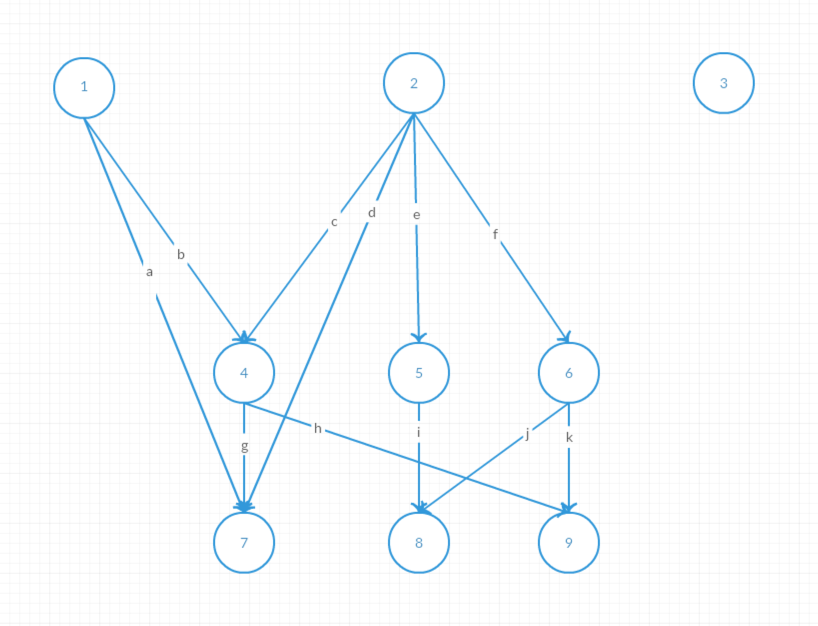
As shown in the diagram above, the concurrent execution steps are as follows:
a and b are removed. However, ④ and ⑦ still have dependencies and cannot execute, so no new tasks are triggered.c, d, e, and f are removed. ④⑤⑥ become ready tasks and are submitted by ②'s Follower.i is removed. However, ⑧ still depends on ⑥ and cannot be triggered, so no new tasks are triggered.g and h are removed. ⑦ becomes a ready task and is submitted by ④'s Follower. ⑨ still depends on ⑥, so no new tasks are triggered.j and k are removed. ⑧⑨ become ready tasks and are submitted by ⑥'s Follower.As shown in the diagram above, the concurrent execution steps are as follows, with task ④ failing:
a and b are removed. However, ④ and ⑦ still have dependencies and cannot execute, so no new tasks are triggered.c, d, e, and f are removed. ④⑤⑥ become ready tasks and are submitted by ②'s Follower.i is removed. However, ⑧ still depends on ⑥ and cannot be triggered, so no new tasks are triggered.j and k are removed. ⑧⑨ would be ready tasks, but ⑨ is marked as failed, so only ⑧ is submitted.All graph updates must be atomic. When step 7 executes, the downstream tasks ⑦ and ⑨ related to ④ must already be in a failed state. Swapping the order of steps 6 and 7 does not produce a different result. If steps 6 and 7 complete simultaneously, Job Center periodically detects this situation and submits ready task ⑧.
If any in-flight Follower is unable to execute due to a power failure or network interruption, a scheduled task triggered by the Scheduler checks the status of all subtasks of running Jobs, including each subtask's executor Handler (see Job Recovery mechanism), start time, and the timeout duration for submitted but unexecuted tasks. Any abnormal tasks are resubmitted, and the system waits for the final Follower to trigger the Leader to complete the Job. If execution is interrupted after all Followers have completed but before the result is submitted back to the Leader—due to a power failure or system crash—the Scheduler resubmits the task to the Leader for processing.
The Job Recovery mechanism is designed to ensure that any distributed task is always in either a "completed" or "failed" state, and never in an intermediate state. For example, failures caused by power, network, disk, or OS issues do not leave any task (such as creating a virtual machine or creating a disk) in an intermediate state that would lock the resource.
Job Recovery is implemented as a scheduled task that checks periodically. When the scheduled time arrives, Job Center Scheduler triggers a task and sends it to Job Center Worker to check whether any Jobs need recovery. The task sent to Job Center Worker is a cluster task with no specified node, so it works as long as at least one node in the cluster is healthy.
In addition, because Job Recovery tasks are cluster tasks, to prevent an accumulation of too many tasks of the same type due to delays or burst task volumes, the Job Queue feature is used to ensure only one cluster recovery task runs at a time.
The Job description contains the following information used for recovery determination:
Handler
Records the current handler of the Job or its subtask, identified by the temporary UUID assigned when each Job Center Worker starts.
Creation time of Job and each subtask
The creation time of the Job is the time it was submitted to the database; the creation time of a subtask is the time it was written to the database after Splitter analysis.
Last modification time of Job and each subtask
Completion time of Job and each subtask
The completion time of a subtask is the time that the individual subtask is completed; the completion time of the Job is the time all tasks in the Job are completed.
Job Recovery rules:
