AVE virtual distributed switch (VDS) is an abstract virtual switch concept used to manage virtual switches across multiple hosts (implemented in AVE based on the open-source Open vSwitch). This allows unified configuration and management of virtual switches on multiple hosts, and ensures network consistency when virtual machines migrate between different hosts.
In practice, AVE virtual distributed switch can also be viewed as an extension of physical switches onto server hosts. As shown in the diagram below, AVE virtual distributed switch manages the physical NICs of hosts and the virtual ports of virtual machines. Each virtual port of a virtual machine corresponds to one virtual port on the virtual switch, and one or more physical NICs of the host serve as uplink ports (Uplink-Port) of the virtual switch.
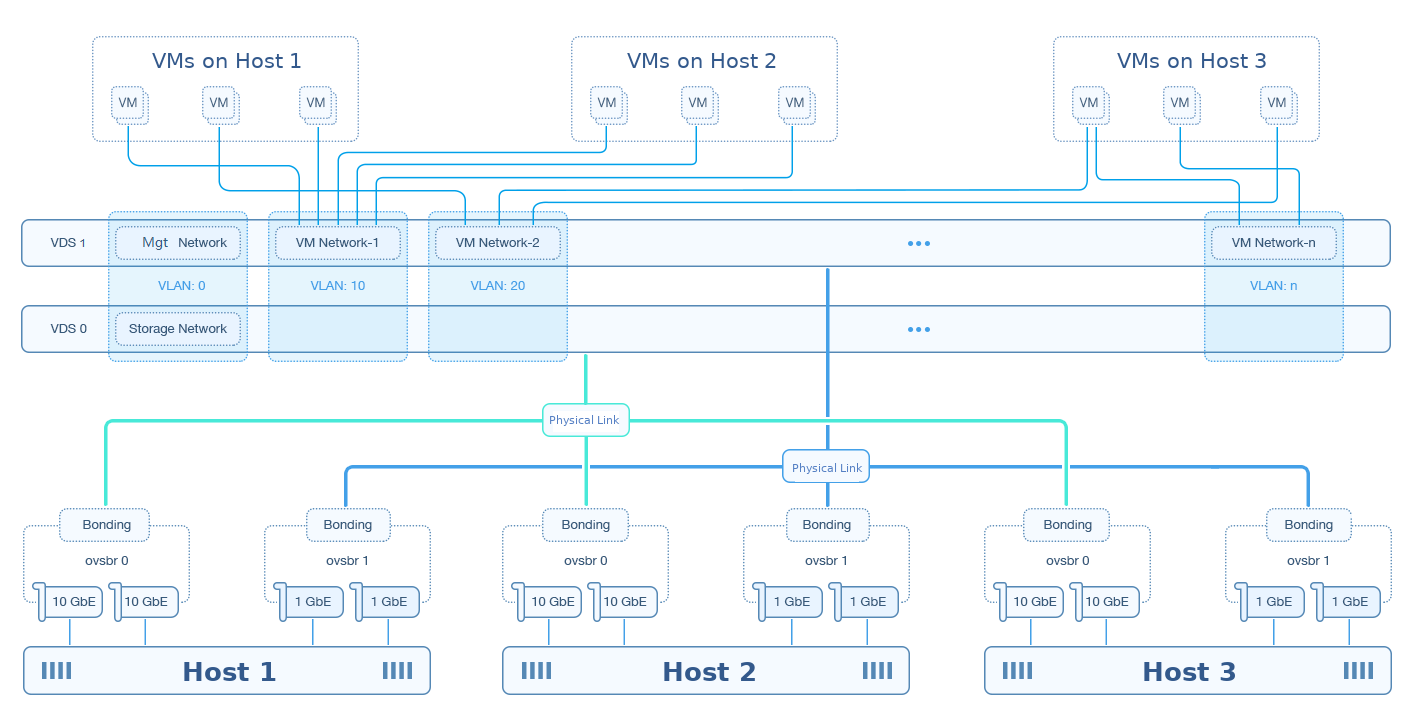
A virtual switch can create multiple virtual ports (no more than 1,024 is recommended to ensure quality of service) for connecting to virtual machine virtual ports. It can bind one or more virtual ports simultaneously for communication between virtual machines and external networks. One physical NIC of a host can belong to only one virtual switch, but a virtual switch can bind multiple physical ports, in which case those physical ports are in a bonding relationship. AVE VDS is based on OVS (Open vSwitch), so AVE virtual distributed switch uses OVS Bond as the default bonding type. If the storage network has RDMA enabled, the virtual distributed switch associated with the storage network uses OVS Bond as the bonding type.
Based on the connectivity defined jointly by the virtual distributed switch and VLAN ID, AVE abstracts the concept of a "virtual network." To meet the different needs of management, storage, and virtual machines, AVE defines three types of virtual networks:
Technically, these three network types are identical; they differ only in their logical roles. Creating virtual machines is not supported on management networks or storage networks.
Network management supports creating, editing, and deleting virtual distributed switches. However, the VDS to which the management network and storage network belong are subject to the following rules:
VM networks can be created under any VDS, and support editing and deletion. A VM network can be deleted only if it is not in use by any virtual machine, VM template, or VM snapshot; otherwise, deletion cannot be performed. Editable fields for VM networks include: network name, VLAN ID, and QoS policy.
The management network, due to its management role, supports only editing. Unlike VM networks, its editable fields include: VLAN ID, gateway, subnet mask, the management IP of each host, MTU, and QoS policy.
The storage network supports editing only the MTU and QoS policy.
