Virtual machines are the core of AVE, providing virtual computing services to users. AVE uses KVM as the foundation, with libvirt assisting in virtual machine construction and management. To ensure virtual machines benefit from high reliability, high availability, and other cluster features, virtual machine HA, migration, and auto-scheduling capabilities are also included.
The main features provided for virtual machines include:
Virtual machine auto-scheduling is an important component of virtual machine management. Its purpose is to automatically schedule the creation or startup of virtual machines based on cluster usage, to achieve a balanced distribution of virtual machines within the cluster.
In AVE, VM Scheduler implements the scheduling algorithm in conjunction with Job Center to complete virtual machine auto-scheduling. VM Scheduler is deployed on 3 or 5 nodes as needed, with exactly one instance in the Active state; it switches together with the ZBS-Meta Leader, always residing on the same node as the ZBS-Meta Leader. VM Scheduler also uses MongoDB to store node resource data under processing. When VM Scheduler is unavailable, all resource-allocation functions for virtual machines, such as creation, start, and migration, become unavailable.
VM Scheduler uses a filter chain to screen nodes, then calculates a score for each eligible node, and finally selects the optimal node as the scheduling target. The process is shown in the diagram below:
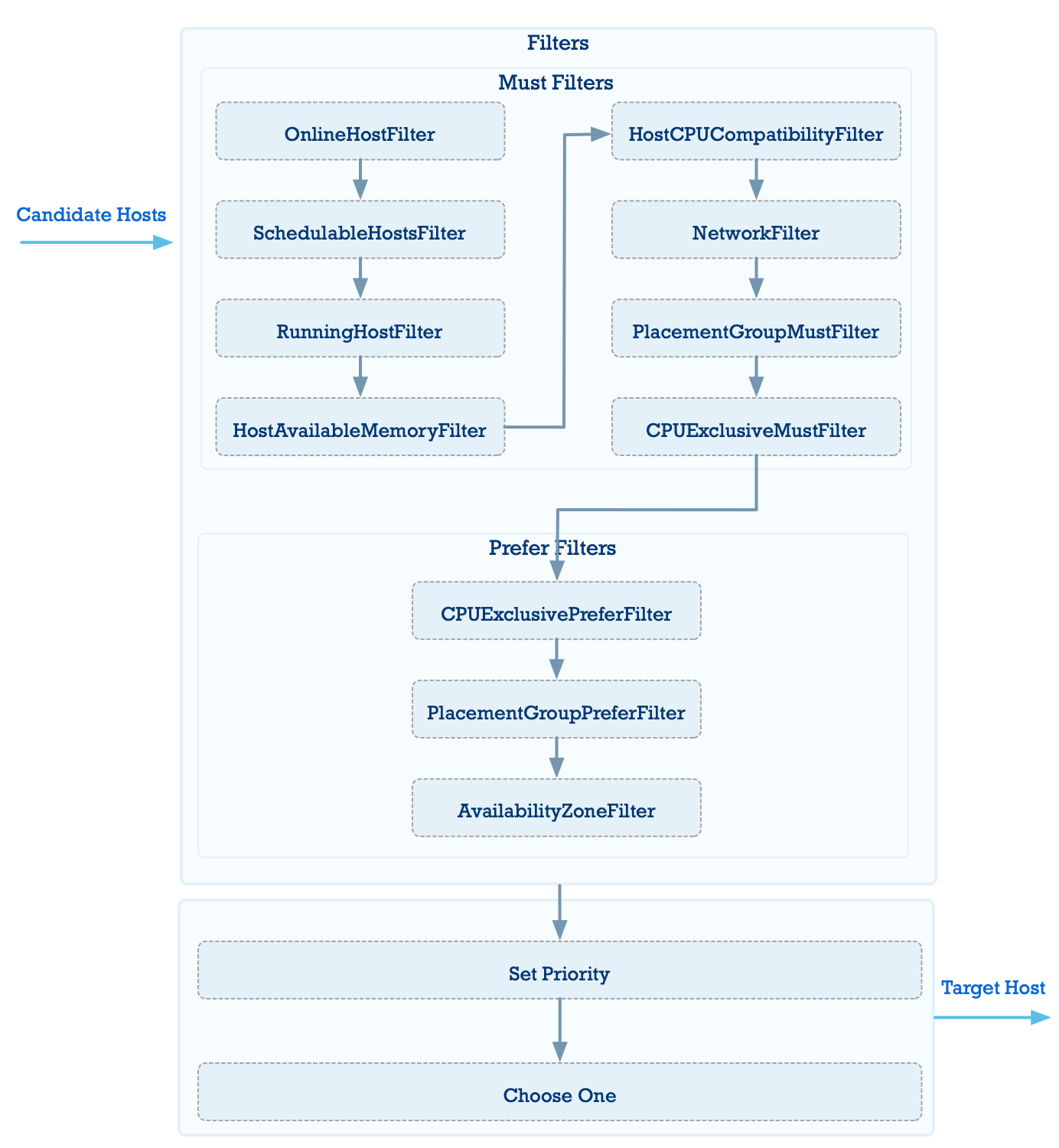
The filter chain consists of multiple filters that screen available hosts. The main filtering functions are:
Filter out nodes that do not meet the hard physical requirements of the virtual machine
Nodes are filtered out based on hard criteria such as: whether the node is alive, network environment configuration, CPU compatibility, whether the total memory allocated to virtual machines on a single node exceeds physical memory, and whether host maintenance mode is enabled.
Filter out nodes that do not satisfy VM placement group policy requirements
A VM placement group policy is a set of rules governing where virtual machines are placed. Once enabled, it becomes a mandatory policy with higher priority than the criteria above. AVE currently supports three types of placement group policies:
In an active-active cluster, you can also configure availability zone placement policies. However, for a single VM-host placement group policy, you can only select either host or availability zone for hosting the virtual machines, not both simultaneously. AVE currently supports the following availability zone placement rules:
In an active-active environment, when no availability zone placement group policy is configured, nodes in the primary availability zone are prioritized
If available nodes exist in the primary availability zone, they are prioritized. Nodes in the secondary availability zone are selected only when no available nodes exist in the primary availability zone.
Select nodes that support CPU pinning for the virtual machine, based on the scheduling scenario
After filtering, if more than one node remains, the nodes are scored and ranked using the following algorithm based on whether the virtual machine is currently in the Running state:
When the virtual machine is in the Running state:
CPU score = (Total vCPUs of Running virtual machines on the host + vCPUs required by the current virtual machine) / (Total vCPUs allocated across the cluster + vCPUs required by the current virtual machine)
Memory score = (Total memory of Running virtual machines on the host + Memory required by the current virtual machine) / Total physical memory of the node
Host score = (CPU score + Memory score) / 2
When the virtual machine is in the Shutdown state:
CPU score = (Total vCPUs of all virtual machines on the host + vCPUs required by the current virtual machine) / Total logical CPUs of the physical node
Memory score = (Total memory of all virtual machines on the host + Memory required by the current virtual machine) / Total physical memory of the node
Host score = (CPU score + Memory score) / 2
The node with the lowest host score has the highest weight and is ultimately selected as the scheduling target.
The preceding host scoring algorithm aims to distribute resources evenly. In batch scheduling scenarios, this may cause some virtual machines to fail to be scheduled when cluster memory resources are tight. This algorithm is not suitable for VM HA recovery scenarios, where recovering more virtual machines takes priority over resource balance. Therefore, in batch scheduling scenarios, the VM scheduler uses a different scheduling order combined with a compact resource allocation algorithm, where nodes with less available memory are assigned higher weights. If the compact resource allocation algorithm can successfully schedule more virtual machines, it will be selected.
A VM snapshot is a backup of virtual volume states and virtual machine configuration. Virtual machines and VM snapshots are independent of each other and do not depend on one another.
Each VM snapshot includes the following:
In addition, VM snapshots support the following operations:
A VM template is similar to a VM snapshot in that it also backs up virtual volume states and virtual machine configuration. However, unlike a snapshot, a template can be used to create new virtual machines in batches after it is created, and rollback is not supported. Additionally, the virtual volume snapshots in a VM snapshot are implemented using ABS snapshot features, whereas the virtual volume templates in a VM template are handled through the clone mechanism controlled by the ACOS virtual machine service. Virtual machines and VM templates are independent of each other and do not depend on one another. Each virtual volume under a VM template is a new volume cloned by ABS; this special virtual volume is not displayed or used within AVE.
Each VM template includes the following:
Supported operations for VM templates:
Built on top of ABS, AVE uses ABS's iSCSI feature to create virtual volumes for virtual machines. The advantages of ABS give virtual volumes high performance and high availability.
When using ABS storage features in AVE, each virtual volume corresponds to one iSCSI LUN. AVE helps users interact with ABS more conveniently, so some ABS concepts, such as iSCSI target, are hidden in AVE and do not need to be perceived. You only need to create a virtual volume and set the corresponding storage policy; AVE handles all underlying interactions and associations with ABS.
Virtual volume snapshots are based on ABS volume snapshots. The iSCSI LUN used by an AVE virtual volume belongs to an ABS volume, so taking a snapshot of the ABS volume completes the snapshot creation for the iSCSI LUN.
ISO images are built on ABS's iSCSI service. Each uploaded ISO image is saved to an iSCSI LUN and mounted to virtual machines for use as a CD-ROM.
Currently, the only supported method for creating images is browser upload. The browser automatically splits the file and uploads it in chunks.
