You can check the dedicated maintenance process according to the virtualization platform of the cluster.
AVE platform

VMware ESXi platform
When using this mode in an ACOS (VMware ESXi) cluster, you may also need to enable maintenance mode on the ESXi host.
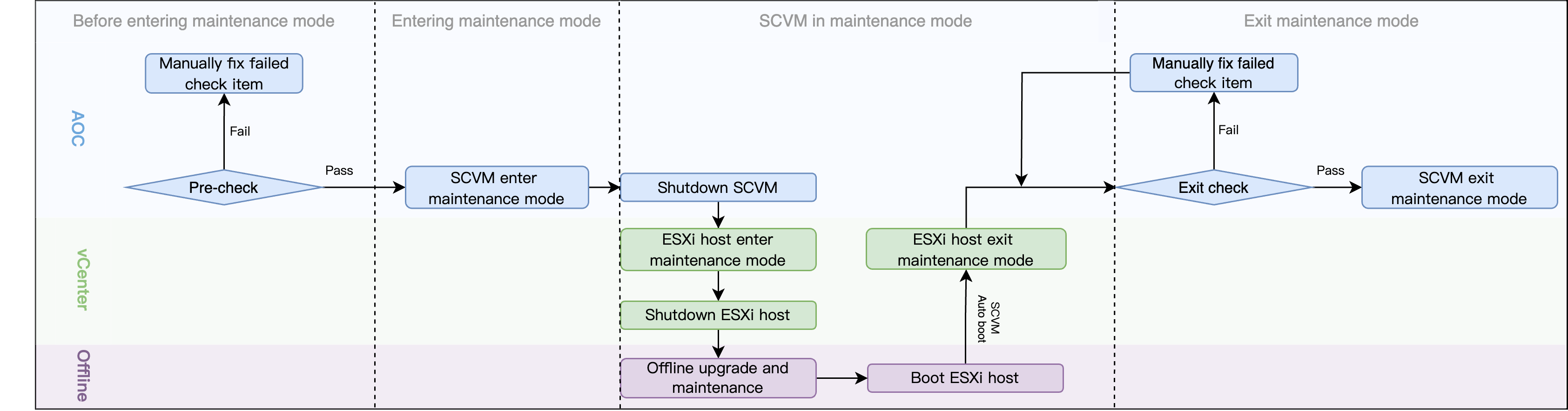
Before entering maintenance mode: The system performs a precheck. Maintenance mode can be entered only if the cluster, host, and SCVM meet the required conditions.
Entering maintenance mode: Enable maintenance mode for the host or the SCVM. The host or SCVM status will be Entering maintenance mode.
For a host in an ACOS (AVE) cluster, during the maintenance mode entry process, the system will automatically hot migrate all Running virtual machines on the host to other hosts in the cluster. Virtual machines that cannot be hot migrated will be shut down after your confirmation, and virtual machines with high availability enabled will be cold migrated to other hosts in the cluster.
If data recovery is triggered during this process, entering maintenance mode will be suspended immediately. Once the data recovery is complete, the entering process will be resumed for the host or SCVM.
Host or SCVM in maintenance mode: After the task center prompts that the host or SCVM has entered maintenance mode or the host or SCVM status has been updated to Maintenance mode, you can perform offline upgrade or maintenance operations on the host or SCVM.
Exit maintenance mode: The system performs an exit check. Maintenance mode can be exited only if the host or SCVM meets the required conditions.
For a host in an ACOS (AVE) cluster, when exiting maintenance mode, you can choose to migrate back the virtual machines that were automatically evacuated before entering maintenance mode, and start the virtual machines that were automatically shut down.
