VLAN (Virtual LAN) is a technology that logically divides a Layer 2 network into multiple virtual local area networks to implement Layer 2 network quarantine. Network devices in the same VLAN can communicate with each other, but network devices in different VLANs cannot communicate directly.
Both ACOS system networks and VM networks support VLAN configuration. You can configure different VLAN IDs for different virtual networks to divide the virtual networks into different VLANs for Layer 2 quarantine. The VLAN ID range is 0 to 4095. 0 indicates that no VLAN ID is configured. 4095 is usually a reserved ID, and after it is configured, the final effective state depends on the behavior of the physical switch.
In actual service scenarios, if you need to quarantine different services on the network, configure different VLAN IDs for the VM networks that provide the corresponding services.
The following figure shows a VLAN configuration example.
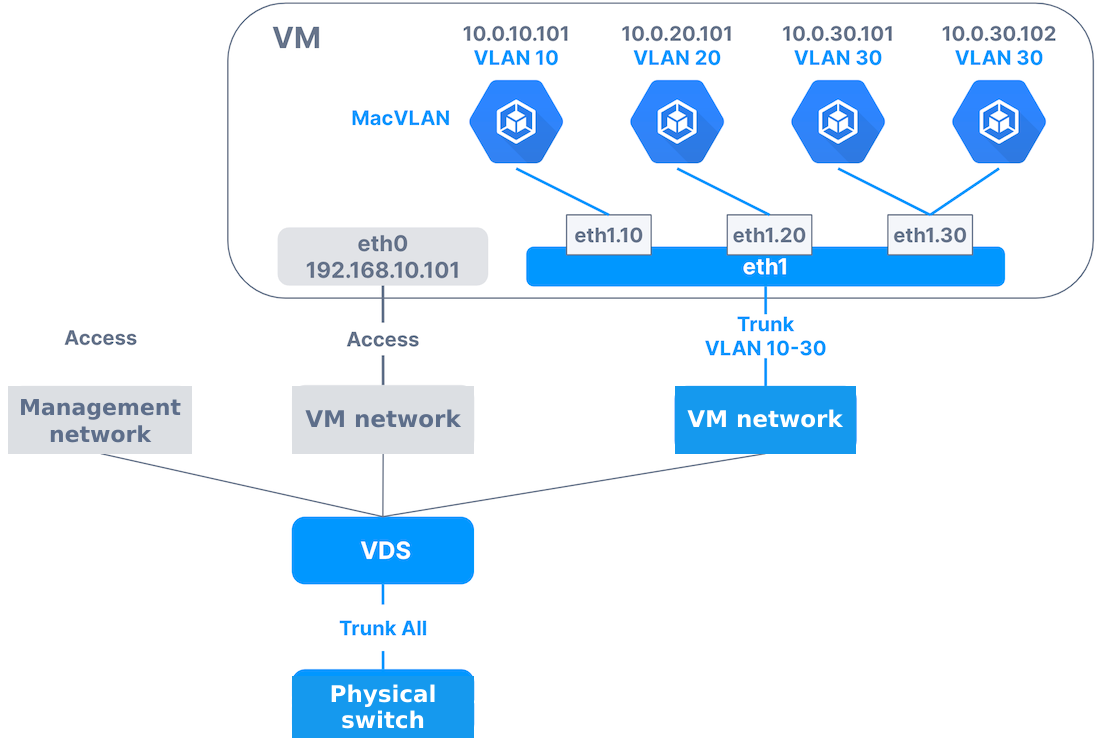
ACOS virtual networks support two types of VLANs: Access and Trunk.
ACOS system networks and VM networks support Access VLANs. An Access virtual network can be configured with only one VLAN ID, and a virtual machine port in an Access VM network can belong to only one VLAN. This type is generally used for ports connected to computers. Traffic of an Access VM network does not carry any VLAN tag when entering or leaving virtual machine ports.
ACOS VM networks support Trunk VLANs. You can configure one or more VLANs, such as 10 or 20-30, and allow data packets of these VLANs to pass through. In a Trunk VM network, network packets sent by virtual machine ports carry VLAN tags to identify the VLANs to which they belong, and virtual machine ports can receive and identify VLAN tags in other network packets. Trunk virtual machine ports are commonly used for connections between switches to forward network traffic from different VLANs. To configure a VM network as the Trunk type, configure the corresponding VLAN subinterfaces in the virtual machine.
For Access system networks and VM networks, the physical switch ports connected to the uplink NICs on the corresponding virtual distributed switch can be configured in Access mode or Trunk mode.
For Trunk VM networks, the physical switch ports connected to the uplink NICs on the virtual distributed switch corresponding to the VM network must be configured in Trunk mode, and the corresponding VLAN ID range must be set.
To ensure that traffic can be forwarded through the physical network, make sure that the VLAN ID range configured on physical switch ports contains the VLAN IDs of all virtual networks in the corresponding virtual distributed switch.
