The following figure shows the network architecture of ACOS deployed on the VMware ESXi platform:
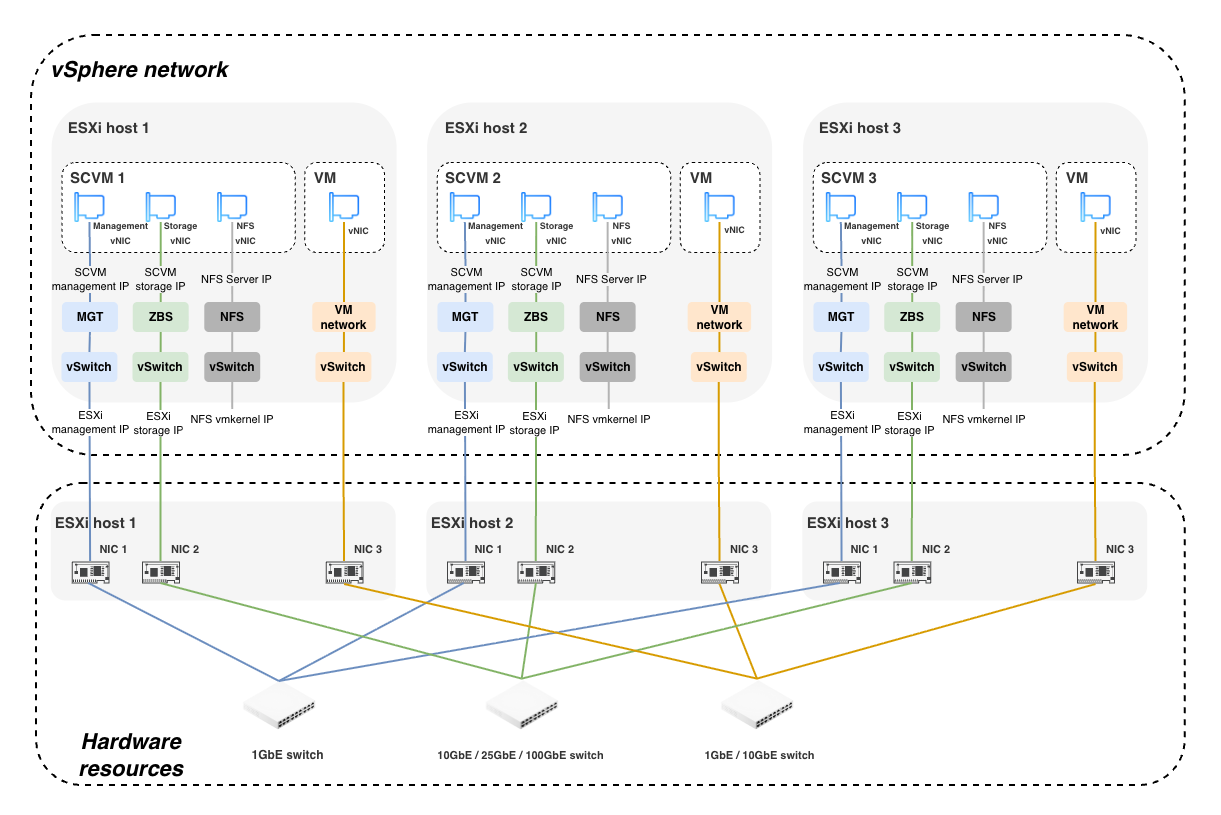
When you integrate ACOS with the VMware ESXi platform, ACOS runs on SCVM virtual machines on ESXi hosts and reuses the virtual networking functions of VMware vSphere.
You need to create three virtual NICs on each SCVM and configure them to the corresponding port groups of the vSphere virtual switch (vSwitch) for the management network, storage network, and NFS network.
The following introduces the important network components of ACOS deployed on the VMware ESXi platform, including the virtual networks and virtual switches used by SCVMs. For more information about VMware vSphere networking, see VMware documentation.
On the VMware ESXi platform, you can create standard virtual switches on each ESXi host to enable communication for the management network, storage network, and NFS network. The included virtual switches and requirements are as follows:
Management network virtual switch: vSwitch0
After ESXi is installed, the system creates a virtual switch for ESXi management and SCVM management by default. The default name is vSwitch0. The vmnic associated with vSwitch0 is the physical network port corresponding to the ESXi management network. In vSwitch0, the system creates a VMkernel with the network label (network name) Management Network and a virtual machine port group named VM Network by default for the ESXi management network and SCVM management network, respectively.
Storage network virtual switch: vSwitch1
By default, you need to create a separate virtual switch (vSwitch1) for the storage network. If the storage network and management network share the same physical NIC, you can reuse the management network virtual switch vSwitch0. The storage network virtual switch must be associated with at least one physical network port with a bandwidth of 10 Gbps or higher.
On the storage network virtual switch, create a virtual machine port group with the fixed network label ZBS to provide the storage network for SCVMs.
NFS network virtual switch
The NFS network virtual switch is used to create the NFS network and NFS VMkernel. Because the NFS network is used only for communication between ESXi hosts and SCVM virtual machines on the local node, the NFS network virtual switch does not need to be associated with any physical NIC.
On the NFS network virtual switch, create a virtual machine port group with the fixed network label NFS to provide the NFS network for SCVMs.
On the VMware ESXi platform, create a series of VMkernel or virtual machine port groups as system networks for communication between ESXi and SCVMs.
ESXi management network: Management Network (VMkernel)
The ESXi management network corresponds to the VMkernel named Management Network in vSwitch0 and is used for management traffic communication between ESXi hosts. The ESXi installation process automatically creates the ESXi management network. You can configure the IP address, subnet mask, gateway, and VLAN ID of this network.
SCVM management network: VM Network (virtual machine port group)
The SCVM management network corresponds to the virtual machine port group named VM Network in vSwitch0. SCVM virtual machines and AOC virtual machines use this network, and this network processes management traffic between SCVM virtual machines.
In each SCVM virtual machine, create a network adapter and associate it with the SCVM management network. You can later configure the management network IP address, subnet mask, gateway, and VLAN ID of the SCVM in this network.
In each AOC virtual machine, create a network adapter and associate it with the SCVM management network. You can later configure the AOC IP address, subnet mask, gateway, and VLAN ID in this network.
SCVM storage network: ZBS (virtual machine port group)
The SCVM storage network corresponds to the virtual machine port group whose network label is ZBS in the storage network virtual switch.
In each SCVM virtual machine, create a network adapter and associate it with the SCVM storage network. You can later configure the storage network IP address, subnet mask, gateway, and VLAN ID of the SCVM in this network.
I/O redirection network (VMkernel connected to the ZBS network)
The I/O redirection network corresponds to a VMkernel and is used for I/O request redirection on ESXi hosts. The I/O redirection network must use the same storage network virtual switch as the SCVM storage network. You can later configure the I/O redirection network IP address and subnet mask in this network.
NFS network (virtual machine port group)
The NFS network corresponds to the virtual machine port group named NFS in the NFS network virtual switch and is used for communication between ESXi hosts and SCVM virtual machines on the local host.
In each SCVM virtual machine, create a network adapter and associate it with the NFS network. The IP address of the NFS network is fixed to 192.168.33.2, and the subnet mask is fixed to 255.255.255.0. They cannot be changed.
NFS VMkernel (VMkernel connected to the NFS network)
The NFS VMkernel corresponds to a VMkernel network adapter and is used for SCVMs to connect to the NFS network. The IP address of the NFS VMkernel is fixed to 192.168.33.1, and the subnet mask is fixed to 255.255.255.0. They cannot be changed.
Service network (virtual machine port group)
This corresponds to a virtual machine port group for service virtual machines and can be used by service virtual machines in the cluster.
