Procedure
Run the following command on any node in the cluster:
ntpm server show
Output example
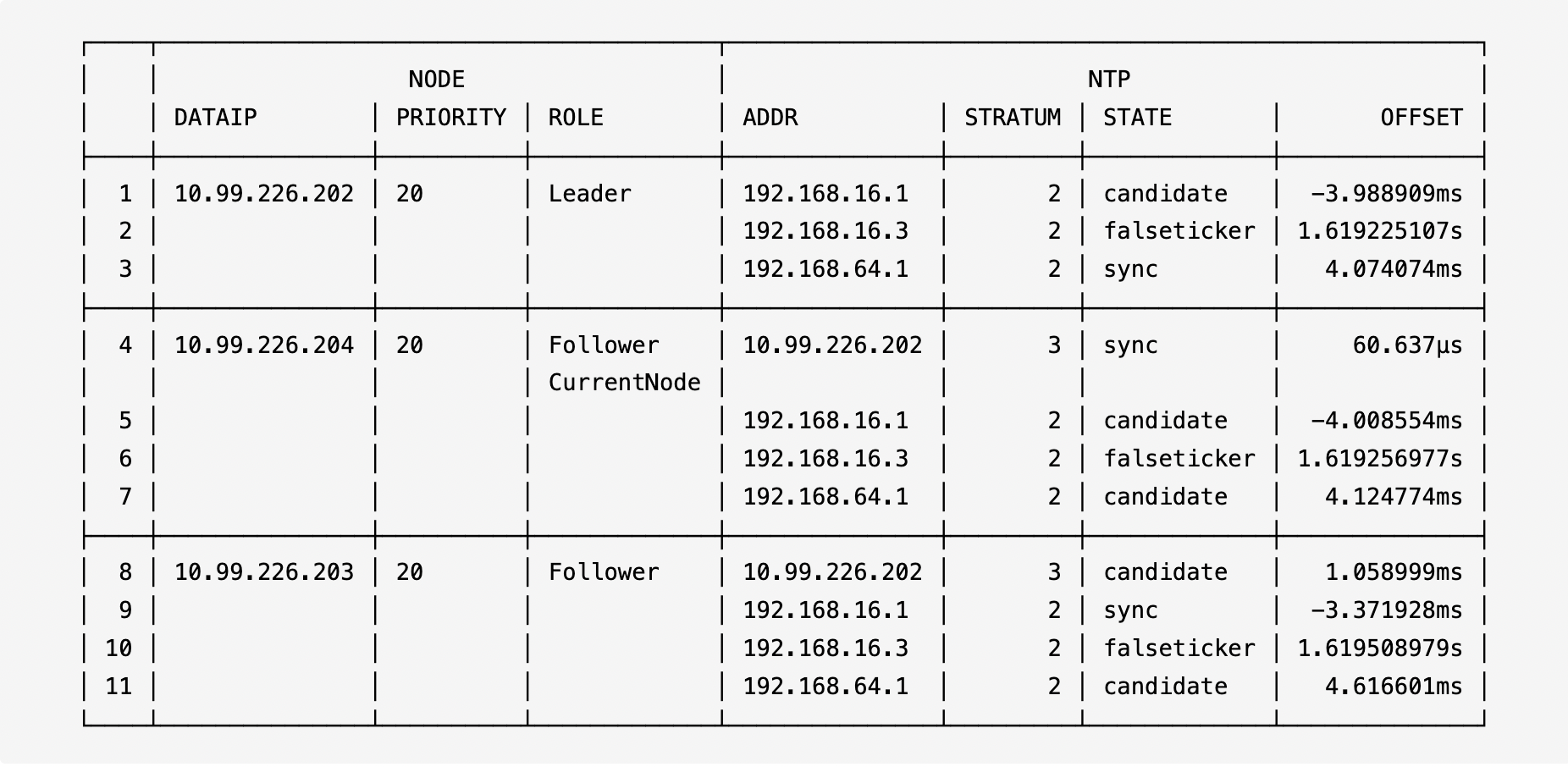
Output note
| Parameter | Description |
|---|---|
NODE DATAIP | The node storage IP. |
NODE PRIORITY | The master election priority of the node. Generated by the internal NTP server. The node with the highest priority will be elected as the Leader. |
NODE ROLE | The role of a node in the cluster. Leader indicates that the node is elected as the leader and serves as the internal NTP server. Follower indicates the node is synchronizing time from the Leader node. CurrentNode indicates the node on which the command is executed. |
NTP ADDR | The NTP server addresses for synchronization. Multiple addresses can be configured. localhost indicates that the node has no NTP server configured and uses its own clock. |
NTP STRATUM | The hierarchy of the NTP server. Lower values indicate higher priority and a more accurate time. |
NTP STATE | The NTP server status. sync indicates that the current node is synchronizing time with the NTP server; falseticker indicates that the NTP server's time is unreliable. |
NTP OFFSET | The time offset between the current host and the NTP server. |
When a node in the cluster has a significant time offset from the NTP server, the time of that node needs to be synchronized with an external NTP server or the NTP Leader.
Procedure
On nodes with inaccurate time, run the following command to synchronize the time with an external NTP server or the NTP Leader:
zbs-node sync_time
Output example
2023-11-09 14:08:48,351 node.py 640 [2509628] [INFO] sync node ntp to internal ntp leader successfullyWhen the cluster uses an internal NTP service or an external NTP server and the overall time offset is significant, synchronize all nodes' time with the external NTP server or the NTP Leader.
Procedure
Run the following command on any node to synchronize the time with the external NTP server:
zbs-cluster sync_time
Output example
The synchronization process is displayed.
This command allows you to view the list of time zones supported by ACOS, making it easier to select an appropriate time zone.
Procedure
Run the following command on any node in the cluster to view all available time zones:
zbs-cluster get_available_timezones
To view time zones within a specific area, you can add a filter parameter. For example:
zbs-cluster get_available_timezones --zone_filter America
Output note
The supported time zone names are displayed, such as America/Los_Angeles.
Procedure
Run the following command on any cluster node to view the time zone settings of all nodes in the cluster:
zbs-cluster show_timezone
Output note
The time zone configuration for each node in the cluster is displayed. If time zones are inconsistent across nodes, you can unify all nodes by setting the cluster time zone.
Procedure
To set the time zone for all nodes in the cluster, run the following command on any cluster node. You can obtain the list of available time zones by running the command for querying the list of available time zones in the cluster.
Take America/Los_Angeles as an example:
zbs-cluster set_timezone --timezone America/Los_Angeles
Output note
The result of setting the time zone for each node in the cluster is displayed.
Next step
To ensure that all cluster services operate correctly under the new time zone, after setting the cluster time zone, you must place all nodes in the cluster into maintenance mode one by one, and then restart each node. For details, refer to ACOS Operations and Maintenance Guide.
