The following figure is an example of the network topology of a file cluster deployed in an Arcfra Cloud Operating System cluster using Arcfra Virtualization Engine, that is, in an ACOS (AVE) cluster, , where the file storage network reuses the virtual distributed switch (VDS) of the ACOS (AVE) cluster storage network, and the file management network reuses the VDS of the ACOS (AVE) cluster management network:
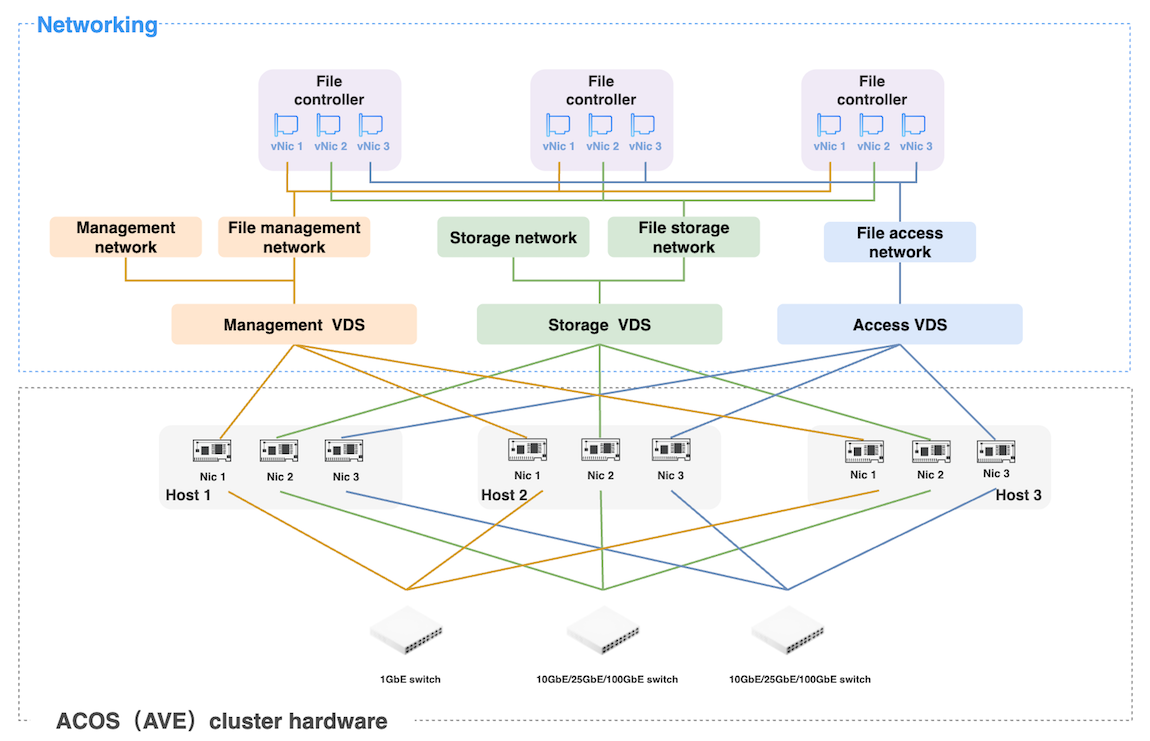
File management network: The file storage cluster communicates with Arcfra Operation Center (AOC) through this network.
File storage network: It serves as the internal storage network of the file storage cluster, which is used by file controllers for data exchange within the file storage cluster.
File access network: The file storage cluster provides file storage services to external clients through this network.
Before deployment, confirm that the ACOS (AVE) cluster has existing virtual machine (VM) networks that meet the requirements in the following table.
| File storage cluster network | Network bandwidth requirements | VM network requirements | Requirements for the VDS of the corresponding VM network |
|---|---|---|---|
| File management network | 1 Gbps and above. | Should be connected to the management network of the ACOS (AVE) cluster. | Should be associated with at least one network interface on each host of the ACOS (AVE) cluster. |
| File storage network | 10 Gbps and above. | Should not be associated with other virtual machines, and thus can be exclusively used by file controllers. | |
| File access network | 10 Gbps and above. | Should be connected to the network of the clients. |
Before deployment, request an IP allocation table from your network administrator according to the table below based on the planned number of file controllers.
| Network type | IP address | Subnet mask | Gateway |
|---|---|---|---|
| File management network | File controller 1: xx.xx.xx.xx File controller 2: xx.xx.xx.xx ··· File controller n: xx.xx.xx.xx |
xx.xx.xx.xx | xx.xx.xx.xx |
| File storage network | File controller 1: xx.xx.xx.xx File controller 2: xx.xx.xx.xx ··· File controller n: xx.xx.xx.xx |
xx.xx.xx.xx | - |
| File access network | File controller 1: xx.xx.xx.xx File controller 2: xx.xx.xx.xx ··· File controller n: xx.xx.xx.xx |
xx.xx.xx.xx | - |
If the IP address of the clients using the file storage service and the file access IP address of the file storage cluster are not in the same network segment, you need to enable the static route configuration. Once enabled, one static route corresponds to one client, and each static route needs to be configured based on the following information:
Note:
The IP addresses of the file management network, file storage network, and file access network must belong to different network segments.
If the static route is enabled, the route gateway must be in the same network segment as the file access IP.
The IP addresses cannot overlap with any IP addresses within the following CIDR ranges:
- 169.254.0.0/16
- 240.0.0.0/4
- 224.0.0.0/4
- 198.18.0.0/15
- 127.0.0.0/8
- 0.0.0.0/8
AFS ensures high availability of cluster's file management network through the file management virtual IP (VIP) address. When the file controller hosting the file management VIP fails, it will be automatically migrated to another healthy file controller to continue providing services externally.
Therefore, plan the file management VIP address for the file storage cluster in advance by referring to the following requirements:
AOC can access the cluster through the file management VIP address.
The file management VIP address and the file management IP addresses of the file controllers are in the same subnet.
The file management VIP address cannot overlap with any IP addresses within the following CIDR blocks:
