Network virtualization is a virtualization technology that transforms network functions originally implemented by hardware devices into functions implemented by software. The goal of network virtualization is to introduce an abstraction layer between physical hardware and the capabilities that use the hardware, so that network-related functions can be implemented. Network virtualization allows software resources and network functions, namely virtual networks, to be delivered independently of hardware. It can be used to consolidate multiple physical networks, further segment virtual networks, and implement network communication between virtual machines and hypervisors.
A virtual network uses network virtualization technologies to simulate a physical network through software. A virtual network reuses the tools and concepts of a physical network, such as switches and NICs, and uses software to extend network functions, enabling simpler and more efficient network configuration.
A virtual network can connect multiple computers, virtual machines, physical hosts, or other devices across different locations and data centers in the same way as a physical network. Compared with a physical network based on hardware devices, a virtual network is software-defined. Network administrators can remotely update and test different parts of the network without switching or purchasing additional hardware devices, making network management more centralized, convenient, and simple. In addition, when providing networks for specific requirements and applications, virtual networks offer greater flexibility and can move applications across network infrastructures without affecting services, security, or availability.
Common components of a virtual network include virtual NICs, virtual interfaces, virtual switches, virtual local area networks (VLANs), virtual routers, and virtual gateways. On the ACOS (AVE) platform, a virtual network mainly consists of virtual distributed switches, virtual NICs, system networks, and VM networks. The overall framework is shown in the following figure:
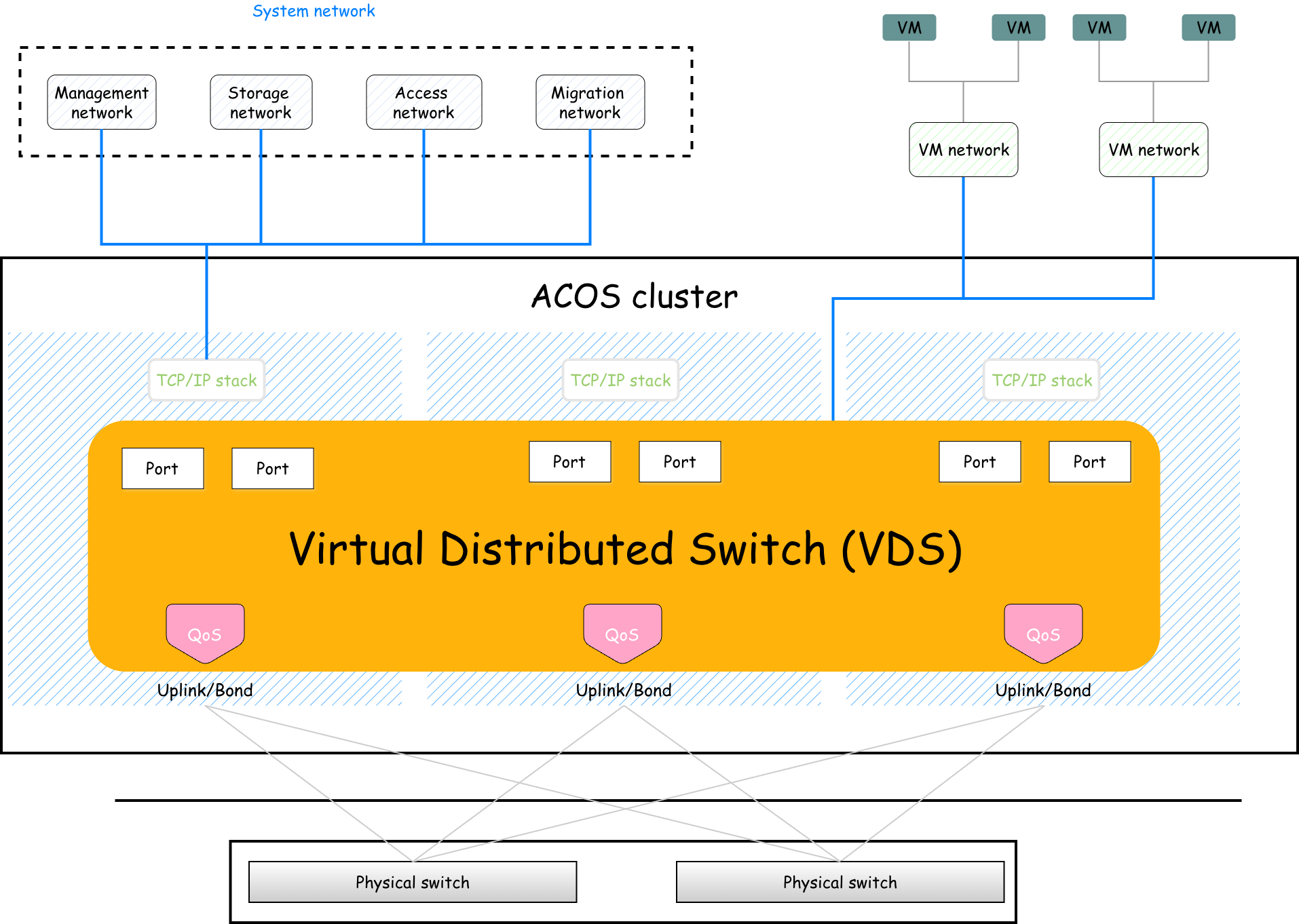
A virtual distributed switch (VDS) is a switch implemented through software. VDSs and physical switches provide similar functions, enabling network communication for the devices connected to them. The difference is that physical switches connect physical devices and implement network connectivity between hardware devices, whereas VDSs mainly run in virtualization environments. Virtual machines can establish network connections on a VDS and communicate with other virtual machines or external networks through the VDS.
A VDS uses a distributed architecture and provides a unified network control plane to manage virtual network connections on all hosts. This enables unified configuration and management of virtual switches on multiple hosts and ensures network consistency when virtual machines migrate between hosts.
A VDS is associated with physical ports on hosts. After the association, a VDS data plane instance, namely an OVS bridge implemented based on the open source Open vSwitch, is created on each host to forward network traffic on the host, tag and untag VLANs, and process security rules and QoS policies.
A VDS can also be considered an extension of a physical switch on a server host. A VDS manages physical network ports on hosts and virtual network ports on virtual machines. One virtual NIC of a virtual machine corresponds to one virtual port (Port in the figure) on the virtual switch, and one or more physical network ports on the host serve as uplink ports (Uplink-Port) of the virtual switch.
A VDS can be associated with one or more physical network ports on each host. If a virtual switch is associated with only one physical network port, issues such as a single point of failure and bandwidth limitations may occur. To resolve these issues, you can associate two or more physical network ports to increase network bandwidth and implement high availability.
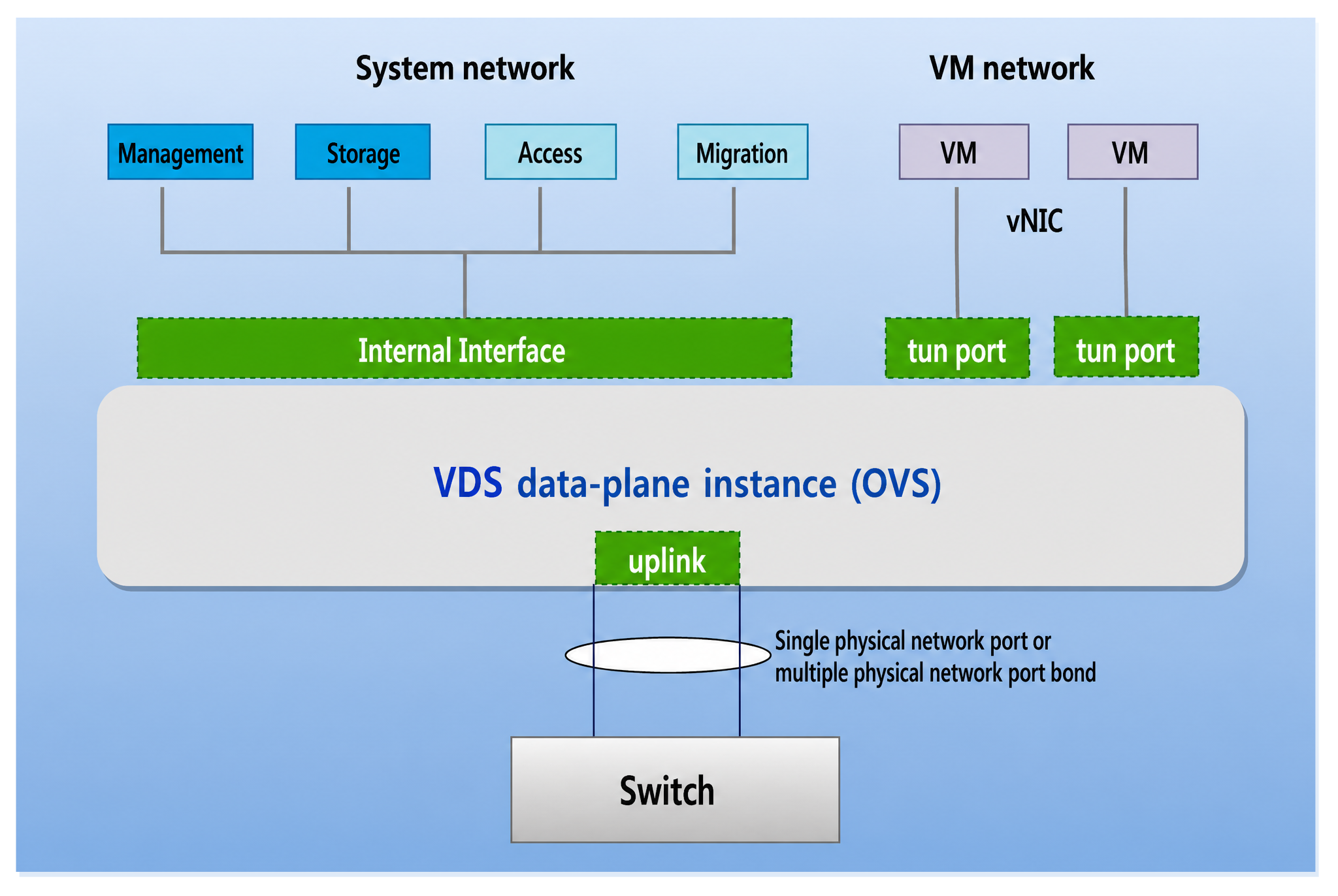
A virtual NIC (Virtual Network Interface Card, also known as a virtual network interface adapter) simulates the functions of a physical NIC through software and is a key component for connecting virtual machines to external networks. A virtual NIC can be configured with an IP address and MAC address like a physical NIC.
ACOS virtual machines support E1000 and VirtIO virtual NICs. The backend of both virtual NIC types is supported by TUN devices implemented through software. E1000 is a virtual NIC type implemented by simulating the functions of an Intel E1000 physical NIC, whereas VirtIO is a virtual NIC type implemented by using the VirtIO standard virtual I/O framework. Because their implementation methods are different, VirtIO virtual NICs provide better performance than E1000 virtual NICs.
ACOS also supports virtual NICs used by system networks. Such virtual NICs are supported by internal interfaces created through OVS bridges.
A system network is a virtual network used by services on a host. A system network is a virtual port on a VDS and must be created on a specific VDS. After an IP address, subnet mask, gateway, and other settings are configured for a system network, system network traffic can enter the VDS or the corresponding application after being processed by the host network protocol stack.
System networks support MTU and QoS policy configuration, including reserved bandwidth, maximum bandwidth, service priority, and burst traffic limit.
VLAN IDs and IP addresses can be modified for all system networks. However, modifying them interrupts the corresponding system networks. Modify them based on your actual conditions.
The management network is a system network used by the management services on a host. It is used for users to access and manage the cluster and to connect to supporting products such as AOC, ANS, and ABDR.
Each ACOS node can have only one management network. During cluster installation and deployment, the management network must be created, and the management IP address, subnet mask, default gateway, VLAN ID, and other settings must be configured. After the management network is created, it cannot be deleted, but its configuration can be modified as needed.
The storage network is used by the distributed block storage service on hosts. The backend distributed block storage service works properly across hosts through the storage network.
Each ACOS node can have only one storage network. During installation and deployment, the storage network must be created, and the storage IP address, subnet mask, VLAN ID, and other settings must be configured. After the storage network is created, it cannot be deleted. The VLAN ID, MTU, and QoS policy can be modified.
Information:
After RDMA is enabled, the storage network does not support modifying the VLAN ID or configuring QoS policies.
The migration network is used for intra-cluster migration and cross-cluster live migration of virtual machines. A migration network can be created as needed and supports editing and deletion.
If no migration network is created:
The access network is used to provide storage access services for other compute clients. If you need to provide the distributed block storage service of an ACOS (AVE) cluster to other compute clients through the iSCSI protocol, create an access network.
The mirroring egress network is dedicated to sending encapsulated mirrored traffic to the destination. In the traffic mirroring feature, one system network is required to send encapsulated mirrored traffic. Currently, the management network or mirroring egress network is supported.
If any of the following conditions or requirements exists, you are advised to create a dedicated mirroring egress network:
A VM network is used by running virtual machines. Based on service requirements, multiple VM networks can exist in a cluster. A virtual machine can connect to different VM networks through different virtual NICs. When a virtual machine migrates between different hosts in a cluster, the VM network ensures that services provided by the virtual machine are not interrupted during migration and that the network database does not need to be reconfigured. VM networks can be configured with attributes such as VLAN and QoS. For details about VLAN and QoS, see VLAN and QoS.
