Prerequisite
An available LDAP or AD server is already set up.
Precaution
You can only configure one LDAP server or one AD server in AOC.
Procedure
| Parameter | Description |
|---|---|
| Server type | Select the server type to be configured:
|
| Name | Enter the name of the server. |
| Description (optional) | Enter a description for the server. |
| Parameter | Description |
|---|---|
| Primary server address | Specify the address (IP/domain name) of the primary server. |
| Encryption | Choose whether to enable encryption. |
| CA certificate (optional) | This option is displayed only if encryption is enabled. Click ... in the upper right corner of the LDAP/AD page, select Upload CA certificate to upload the CA certificate for the authentication and communication encryption between the server and AOC. You can change the CA certificate after uploading it. |
| Primary server port | Specify the port of the primary server. |
| Secondary server | Choose whether to enable the secondary server. Once enabled, if the primary server is down or inaccessible during user login verification, the system will automatically switch to the secondary server for access. |
| Secondary server address | This option is displayed only if the secondary server is enabled. Enter the address (IP/domain name) of the secondary server. |
| Secondary server port | This option is displayed only if the secondary server is enabled. Specify the port of the secondary server. |
| Base DN | Defines the scope of LDAP/AD users synchronized to AOC. |
| Bind DN (optional) | Enter the username for logging in to the LDAP/AD server. The user corresponding to this username should have query permissions to the LDAP/AD server. |
| Bind password (optional) | Enter the bind password corresponding to the bind DN. |
| Filter (optional) | Set filter conditions for users in the range defined by the base DN. Users defined in the filter conditions will not be synchronized to AOC. |
After configuring the server, the system will test the connectivity between AOC and the server. If the connectivity is normal, you can proceed to configure the mapping rules. By configuring the mapping rules between the user information in the LDAP/AD server and the user information in AOC, you can import the user information from the server into AOC, or assign roles to users synchronized to AOC based on the mapping rules.
For more information about user information and roles in AOC, refer to the Managing users and permissions chapter.
Procedure
Configuring Basic information mapping
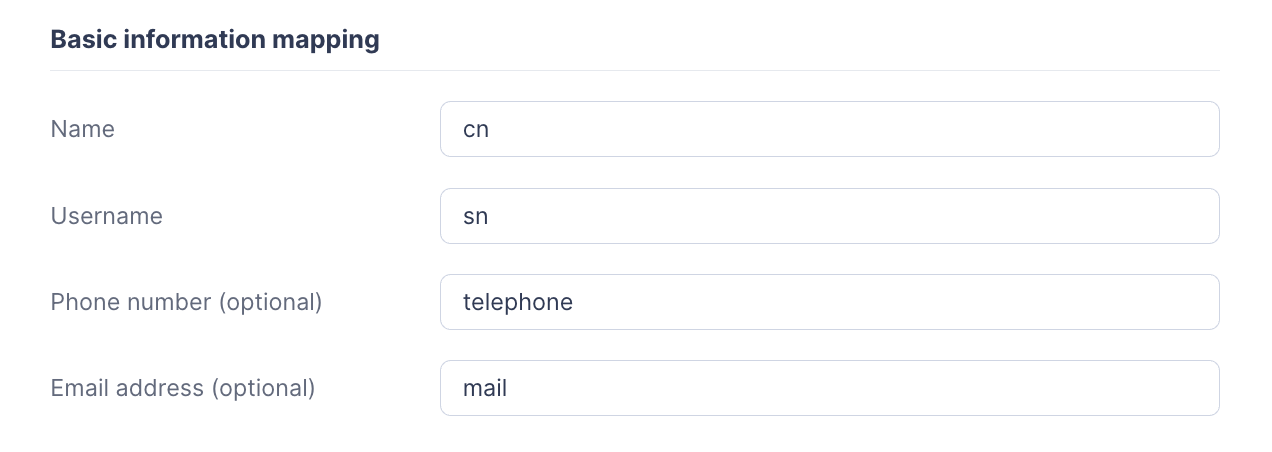
Enter the attributes for Name, Username, Phone number (required if SMS verification is enabled), and Email address (required if email verification is enabled) from the LDAP/AD server, and the values of the attributes will be used as the LDAP/AD user's name, username, phone number, and email address in AOC respectively.
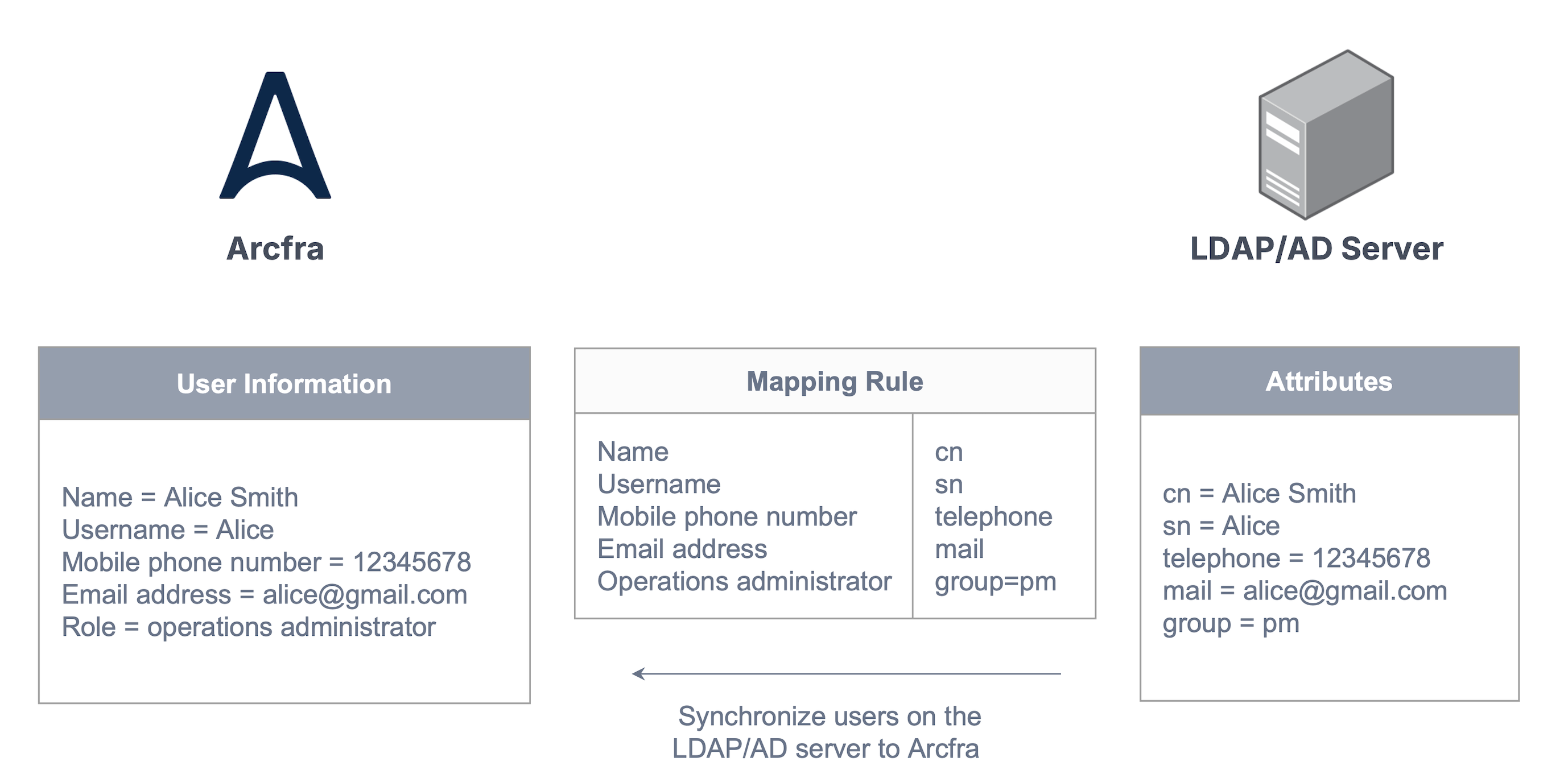
For example, if you need to import the information of a user named Alice Smith from the LDAP/AD server to AOC, the mapping relationship between the attribute and user information along with the synchronization process is shown as follows:
The basic information mapping is therefore configured as:
Configuring Role mapping
Assign roles for users synced to AOC
Click Add mapping rule, set the matching criterion for users in the LDAP/AD server, and select a role in AOC. LDAP/AD users that meet the matching criterion will be assigned the selected role after being synchronized to AOC.
Default role:
Custom role
Note:
You need to set different matching criteria for the two different roles.
Since LDAP/AD servers can group users by either ou or group, when entering the matching criterion, determine whether the group for the target users is defined by ou or group to ensure the correct format for the matching criterion:
If the users are grouped by ou, you need to obtain the RDN value rdn value of the group and filter the users with rdn:dn:=rdn value.
Information:
The above method applies only to the LDAP server.
For example:
Suppose you need to filter all users from the dev group, and the group DN value is OU=dev,DC=aoc,DC=io, then the RDN value of this group will be dev, and therefore the matching criterion should be ou:dn:= dev.
Suppose you need to filter a single user Betty from the dev group, the group RDN value is the RDN value of the organizational unit (OU) to which the group belongs, and the user's DN value is CN=Betty,OU=dev,DC=aoc,DC=io, then the RDN value rdn value of this group will be dev, and therefore the matching criterion should be (&(ou:dn:=dev)(cn=Betty)).
If the users are grouped by group, you need to obtain the DN value groupDn of the group and filter the users with memberOf=groupDn.
Information:
When filtering users by
memberOf= groupDn, the filtered users must have thememberOfattribute.
For example:
Suppose you need to filter all users from the sanjose group, and the group DN value is CN=sanjose,OU=arcfra,DC=arcfra,DC=local, then the matching criterion should be memberOf=CN=sanjose,OU=arcfra,DC=arcfra,DC=local.
Suppose you need to filter a single user Alice from the sanjose group, and the value of the user's memberOf attribute is CN=Domin Admins,CN=sanjose,DC=aoc,DC=arcfra,DC=arcfra,DC=com, then the matching criterion should be (&(memberOf=CN=Domin Admins,CN=sanjose,DC=aoc,DC=arcfra,DC=arcfra,DC=com)(cn=Alice)).
For users outside criterion
For LDAP/AD users outside of any matching criterion but within the base DN range, you can handle them in either of the two ways:
Click Save to apply the server configuration and automatically synchronize users in the specified range to AOC. You can view the users synchronized to AOC in the User management page under the Source field displayed as LDAP/AD.
