View information such as healthy nodes, total storage space, and used storage space of the cluster.
Procedure
Run the following command on any node in the cluster:
zbs-meta cluster summary
Output example
{'alive_meta_hosts': [{'ip': '10.2.234.197', 'port': 10100},
{'ip': '10.2.234.196', 'port': 10100},
{'ip': '10.2.234.198', 'port': 10100}],
'allocated_data_space': 0,
'alloced_lids': 8237,
'alloced_pids': 8242,
'cluster_info': {'access_write_compress_enabled': False,
'default_prio_space_ratio': 0,
'desc': 'acos_cluster_desc',
'is_stretched': False,
'name': 'acos_cluster',
'negotiated_config': {'chunk_zk_session': True,
'deprecated__enable_thick_extent': False,
'enable_config_push': True,
'enable_data_report_channel': True,
'enable_lextent_lease': True,
'enable_offload_unmap': True,
'enable_temporary_replica': True,
'enable_thick_extent': True,
'enable_tiering': True,
'enable_unmap': True},
'no_performance_layer': False,
'object_version': {'lextent_version': 2},
'preferred_zone_id': 'default',
'replica_capacity_only': False,
'uuid': 'fef6f2ea-e2fd-44ba-ac17-f78555e74e7e',
'zk_uuid_recorded': True},
'cluster_perf': {...},
'connecting_nodes': 0,
'data_reduction_info': {'data_reduction_ratio': 0.0,
'data_reduction_saving': 0,
'overall_efficiency': 0.0},
'dirty_cache_space': 539230208,
'error_nodes': 1,
'failure_cache_space': 0,
'failure_data_space': 0,
'healthy_nodes': 2,
'idle_nodes': 0,
'in_use_nodes': 3,
'leader': '10.2.234.197:10100',
'migrate_enabled': True,
'migrate_speed': 0,
'num_ongoing_migrates': 0,
'num_ongoing_recovers': 0,
'num_pending_migrates': 0,
'num_pending_recovers': 0,
'num_pending_recycles': 0,
'perf_allocated_data_space': 538443776,
'perf_failure_data_space': 0,
'perf_planned_space': 5906628608,
'perf_total_data_capacity': 64419790848,
'perf_used_data_space': 538443776,
'perf_valid_data_space': 64419790848,
'provisioned_data_space': 0,
'recover_enabled': True,
'recover_info': {'cross_zone_migrate_speed': 0,
'cross_zone_recover_migrate_speed': 0,
'cross_zone_recover_speed': 0,
'migrate_speed': 0,
'ongoing_migrates_bytes': 0,
'ongoing_recovers_bytes': 0,
'pending_migrates_bytes': 0,
'pending_recovers_bytes': 0,
'recover_migrate_speed': 0,
'recover_speed': 0},
'recover_migrate_speed': 0,
'recover_speed': 0,
'removing_nodes': 0,
'serial': 'fef6f2ea-e2fd-44ba-ac17-f78555e74e7e',
'space_info': {...},
'storage_pools': [...],
'total_cache_capacity': 80524345344,
'total_data_capacity': 1940278738944,
'total_nodes': 3,
'total_prio_volume_size': 0,
'upgrade_mode_duration': 0,
'used_cache_space': 539230208,
'used_data_space': 2684354560,
'valid_cache_space': 80524345344,
'valid_data_space': 1940278738944,
'valid_free_cache_space': 79985115136,
'warning_nodes': 0,
'zone_infos': [...]}Output note
| Parameter | Description |
|---|---|
connecting_nodes | The number of nodes currently being connected. |
dirty_cache_space | The dirty cache space that has not yet been demoted to the data partitions. |
error_nodes | The number of error nodes. |
failure_cache_space | The failure cache space, contributed by unhealthy nodes and now invalid. |
failure_data_space | The failure data space. |
healthy_nodes | The number of healthy nodes. |
idle_nodes | The number of idle nodes. |
provisioned_data_space | The amount of data space that has been provisioned. |
recover_enabled | Whether the data recovery is enabled. The data recovery is triggered when the extent replication factor is less than the expected value. |
removing_nodes | The number of nodes being removed. |
total_cache_capacity | The total cache capacity is the sum of all cache disks. |
total_data_capacity | The total data capacity. |
used_cache_space | The used cache space. |
used_data_space | The used data space. |
valid_cache_space | The valid cache space equals the total cache capacity minus the cache capacity on failed disks. |
valid_data_space | The valid data space equals the total data capacity minus the data capacity on failed disks. |
Note:
When a disk fails or is removed,
total_data_capacitymay be smaller thanused_data_space. This is becausetotal_data_capacityexcludes the space of failed disks or removed physical disks, whileused_data_spaceis only updated after data recovery is complete.
Procedure
Run the following command on any node in the cluster:
zbs-meta cluster perf
Output example
--------------- ------------
read_iops 0.0
read_avgrq 0 B
read_avgqz 0.0
read_bandwidth 0 B/s(0 B/s)
read_latency 0.0 NS
write_iops 0.0
write_avgrq 0 B
write_avgqz 0.0
write_bandwidth 0 B/s(0 B/s)
write_latency 0.0 NS
--------------- ------------
Output note
| Parameter | Description | Unit |
|---|---|---|
read_iops | The cluster read IOPS. | ops/s |
read_avgrq | The cluster read requests average block size (estimated). | byte, automatically adjusted |
read_avgqz | The cluster read requests average depth (estimated). | None |
read_bandwidth | The bandwidth of cluster read requests. | byte/s, automatically adjusted |
read_latency | The cluster read request latency, which reflects the overall cluster storage performance. | ns, automatically adjusted |
write_iops | The cluster write IOPS. | ops/s |
write_avgrq | The cluster write requests average block size (estimated). | byte, automatically adjusted |
write_avgqz | The cluster write requests average depth (estimated). | None |
write_bandwidth | The cluster write requests bandwidth. | byte/s, automatically adjusted |
write_latency | The cluster write request latency, which reflects the overall cluster storage performance. | ns, automatically adjusted |
Procedure
Run the following command on any node in the cluster:
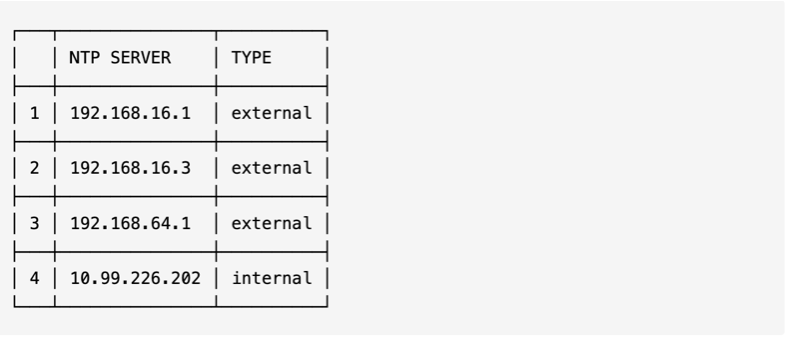
ntpm source show
Output example
Output note
| Parameter | Description |
|---|---|
NTP SERVER | The NTP server address, either an IP address or a domain name. |
TYPE | The NTP server type. external indicates a user-configured external NTP server, while internal indicates using a cluster node as the NTP server. If no external NTP server is configured or all external servers are unavailable, the internal NTP server will be used for synchronization. |
Procedure
Run the following command on any node in the cluster:
zbs-cluster vhost show
Output example
Finish check vhost state.
Cluster vhost status: disabled, allow update.Output note
Cluster vhost status in the output is enabled, it means that cluster Boost mode is enabled.Cluster vhost status in the output is disabled, it means that cluster Boost mode is disabled.