After installing a GPU device on the host, follow the steps in this section to complete the relevant configuration to use the GPU device on a virtual machine.
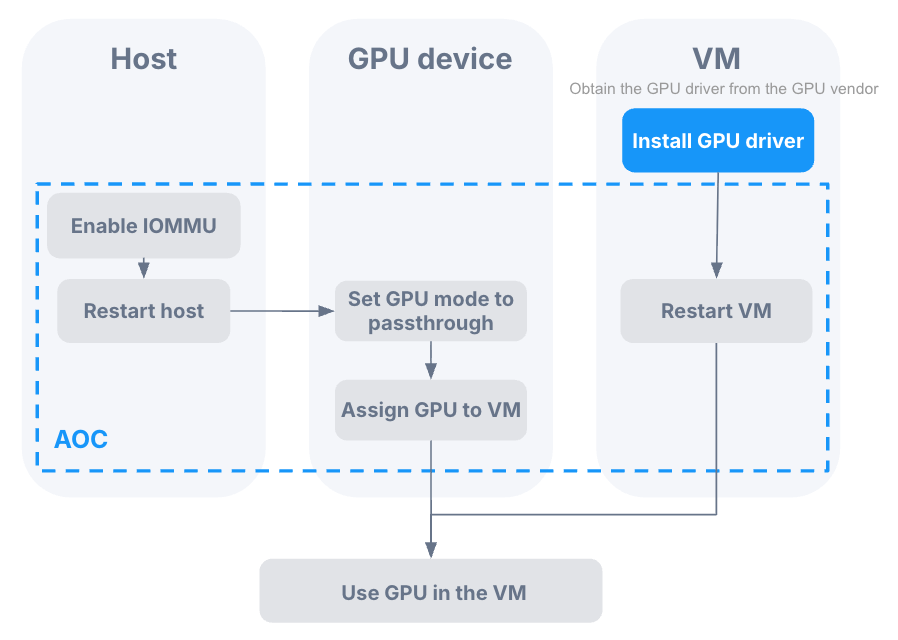
Preparation
Obtain the GPU driver for the virtual machine. You should obtain the GPU driver from the official website of the GPU device manufacturer based on the GPU model, virtual machine operating system, and driver version officially supported by the GPU device manufacturer.
Configuration process
If you use an NVIDIA GPU, you need to log in to the host and run commands to disable nouveau drivers.
cat <<_EOF_ > /etc/modprobe.d/gpu-passthrough-disable-nouveau.conf
blacklist nouveau
options nouveau modeset=0
_EOF_cat <<_EOF_ > /usr/lib/modprobe.d/gpu-passthrough-disable-nouveau.conf
blacklist nouveau
options nouveau modeset=0
_EOF_modprobe -r nouveauLog in to AOC to enable IOMMU for the host where the GPU device is located and restart the host.
Set the GPU mode to passthrough.
If you are using this GPU device for the first time, the GPU mode is passthrough by default. You can proceed directly to step 4. If the GPU has previously been sliced into vGPUs, you need to first switch the GPU mode to passthrough.
To install GPU drivers for virtual machines, refer to the official technical documentation provided by the GPU device manufacturer.
Restart the virtual machine.
